

Why Is Mobile Reception Poor Inside Steel Buildings?
Steel buildings block mobile signal because steel is an effective barrier to radio frequency (RF) energy — the same property that makes it useful for construction makes it a shield against the signal your phone relies on. Cladding, structural steel, reinforced concrete with steel mesh, and low-E (metal-coated) glass all reflect or absorb RF signal rather than letting it pass through. The fix is either a carrier-approved signal booster (Cel-Fi) for a single space, or a distributed antenna system (DAS) for larger or multi-zone buildings — both require a site audit to size correctly.
Why This Happens
Mobile signal travels in a straight line and loses strength every time it has to pass through a solid object. Steel is particularly effective at blocking or reflecting that signal because it’s an electrical conductor — RF energy that hits a steel surface is largely reflected away rather than transmitted through it, sometimes called the “Faraday cage effect.” In a typical steel-framed warehouse, factory or industrial building: cladding and roofing block signal from outside, structural steel and mesh-reinforced concrete add another layer of interference, low-E glass reflects RF signal exactly as it reflects heat, and distance from the nearest cell tower means the signal is already weaker before it reaches the building.
This matters more than it used to. Two-factor authentication, safety check-in apps, EFTPOS terminals, warehouse management systems and cloud-based logistics platforms all assume a mobile connection is available. When it isn’t, staff lose the ability to authenticate, transact, or raise a safety alert from exactly the areas where they’re working.
How to Tell If This Is Your Problem
Poor mobile coverage is a recurring issue for warehouses and industrial buildings, hospitals and health clinics, schools and education campuses, mining camps and remote sites, transport depots and logistics operations, local government buildings, and multi-storey commercial buildings with basement or core areas that sit outside normal signal range.
The Fix
A carrier-approved signal booster (Cel-Fi G41 or G51) is the right starting point for a single building or a defined problem area, and can be deployed relatively quickly since it doesn’t require the same delays as a full carrier application. See Indoor Coverage Boosting →
A Distributed Antenna System (DAS) is the right fit when the problem spans multiple zones, multiple floors, or a building large or complex enough that one booster and antenna isn’t enough. It starts with an RF site survey to map exactly where coverage is failing. See Distributed Antenna Systems →
Both are carrier-approved and installed after a proper site audit — not a guess based on floor plans alone. See the full comparison on our Mobile Coverage Solutions hub →
How Younifi audits and designs a coverage solution
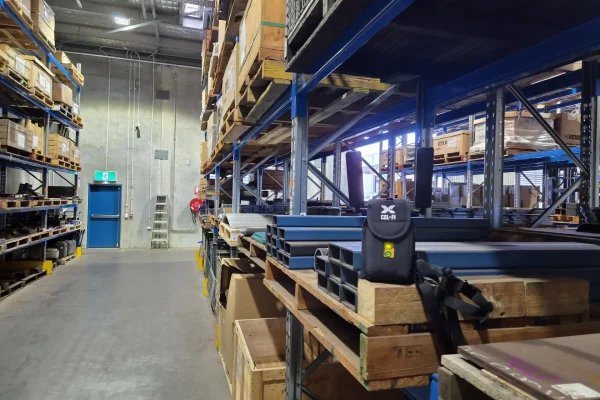
Every project starts with a site assessment rather than a standard package. That typically means:
- An RF site survey to identify where signal actually drops and why
- A review of which carriers your team needs supported
- A design that matches the fix to the problem (rather than over- or under-specifying equipment)
- Carrier-approved installation and commissioning
- Remote monitoring after handover so issues get caught before they’re reported
What drives cost and timeframes
Cost is driven mainly by the size and complexity of the space (number of zones, floors and materials), which carriers need to be supported, and whether the site needs a single booster or a full DAS. A single-zone Cel-Fi install is typically the fastest and lowest-cost option; multi-zone DAS projects take longer because of the site survey and design work involved, but suit large or high-occupancy buildings where a single booster won’t reach. Younifi can give an indicative cost range once a site survey has been done — trying to price this without one usually leads to the wrong-sized system.
Common mistakes and risks
The most common mistake is installing an uncertified or non-carrier-approved booster. These can be switched off remotely by the carrier if they interfere with the network, and in some cases contravene ACMA rules — leaving a business with equipment it can’t legally run. The second most common mistake is undersizing the system for the space, which means the black spot moves rather than disappears. A proper site audit avoids both.
Related services
If the coverage issue is part of a broader connectivity gap — no fixed internet on site, or a need for a permanent tower — see Communications Infrastructure Builds and Networking & Security.
frequently asked questions (faq's)
Why is my mobile signal fine outside but bad inside my building? Steel cladding, structural steel, reinforced concrete and low-E glass all block or reflect RF signal. Once you’re inside the building’s “shell,” the signal that made it to the outside walls often can’t make it any further.
Will a signal booster from a hardware store fix this? Not reliably, and it may be illegal to run. Only carrier-approved boosters like Cel-Fi are designed to work within Telstra, Optus and Vodafone network rules. Non-approved boosters can be switched off remotely and may breach ACMA regulations.
Does the size of the building matter? Yes. A single office or warehouse floor is usually a Cel-Fi fit. Larger, multi-zone or multi-floor buildings usually need a DAS, which starts with an RF site survey to map the problem properly.